 Glimpse Media
Glimpse for Ubuntu and GNOME
 Glimpse File Manager
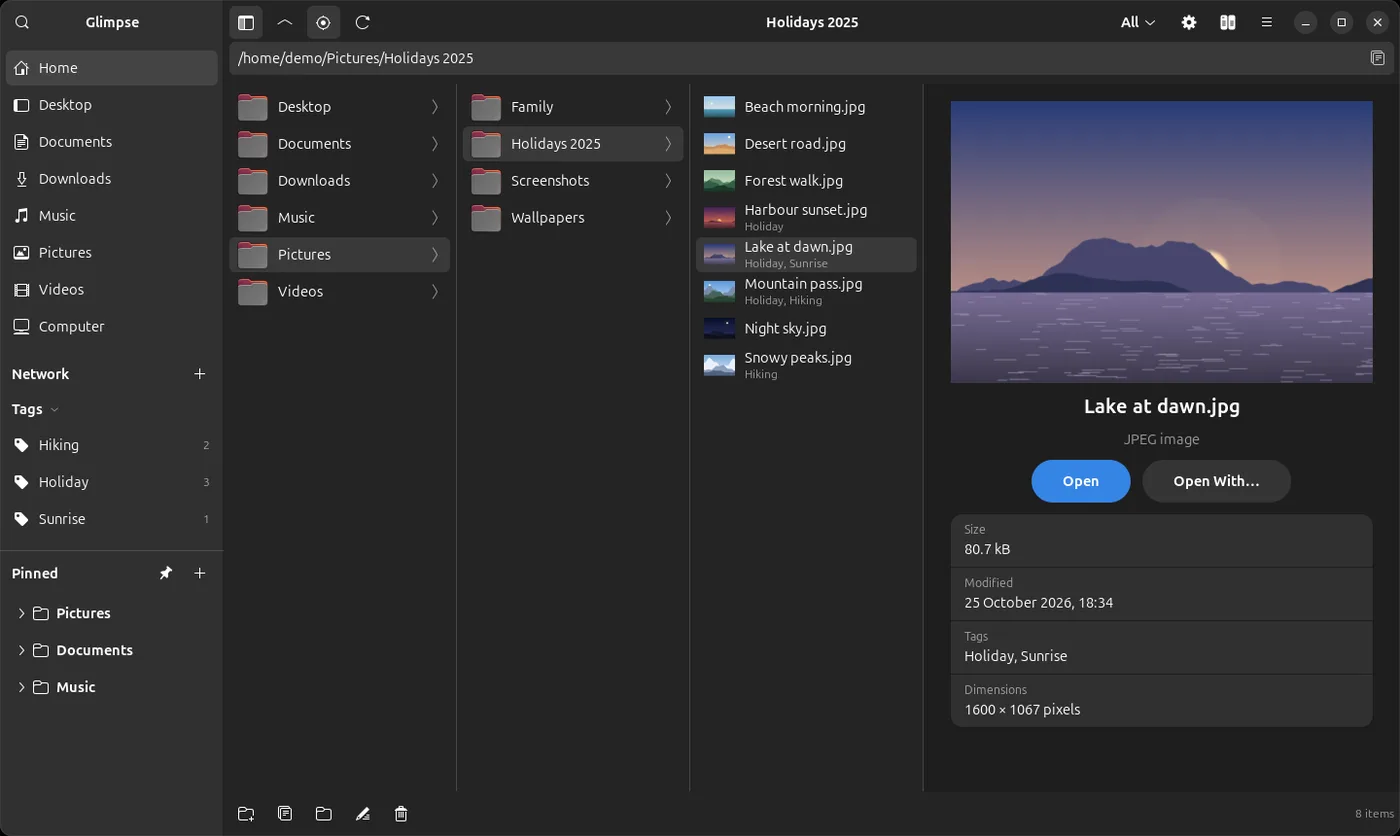
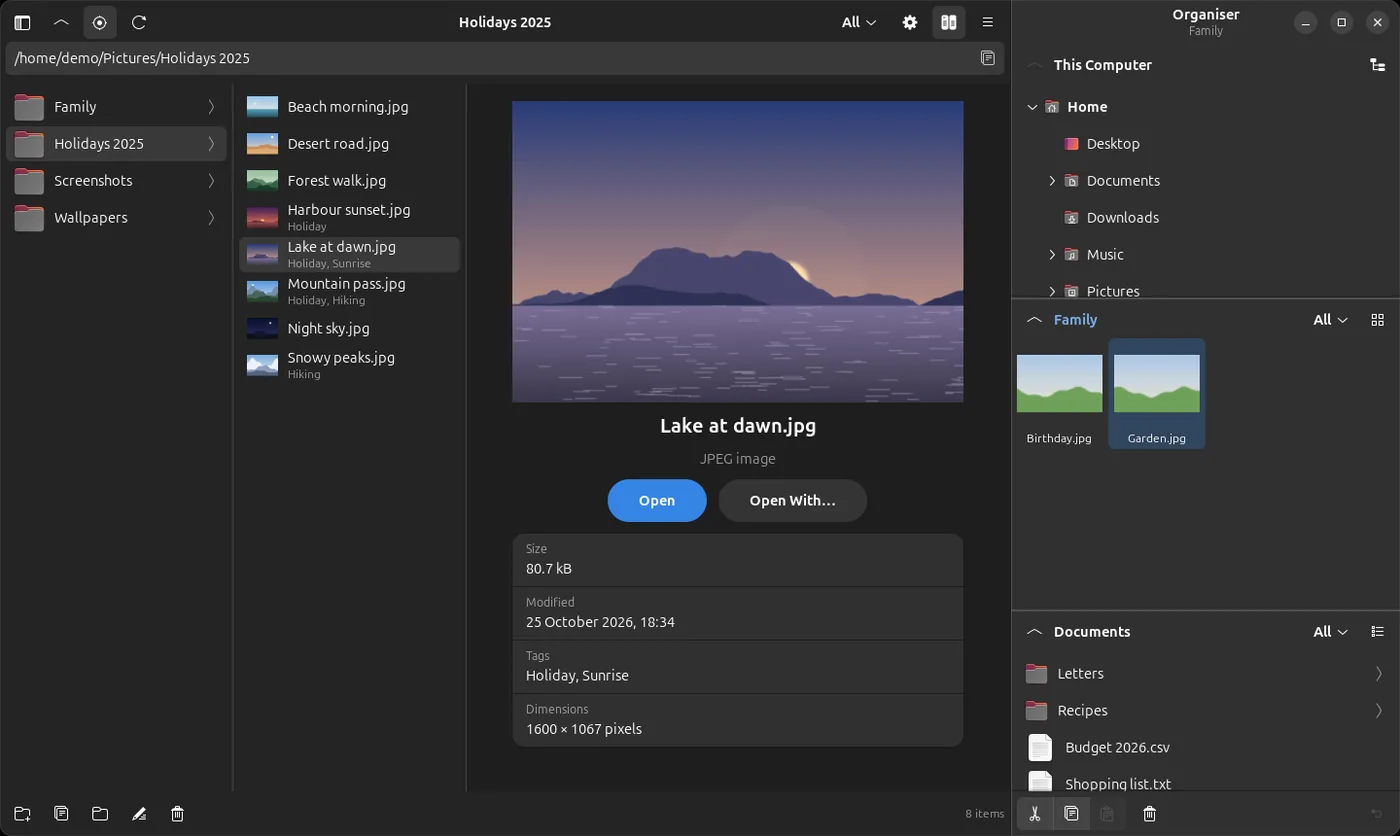
Click a folder and its contents open in the next column; click a file and a preview opens beside them. It brings the full-size Glimpse viewer, picture tags, search and pinned folders, and adds a built-in terminal, an Organiser, Samba network shares and Advanced AI Search.
What it does
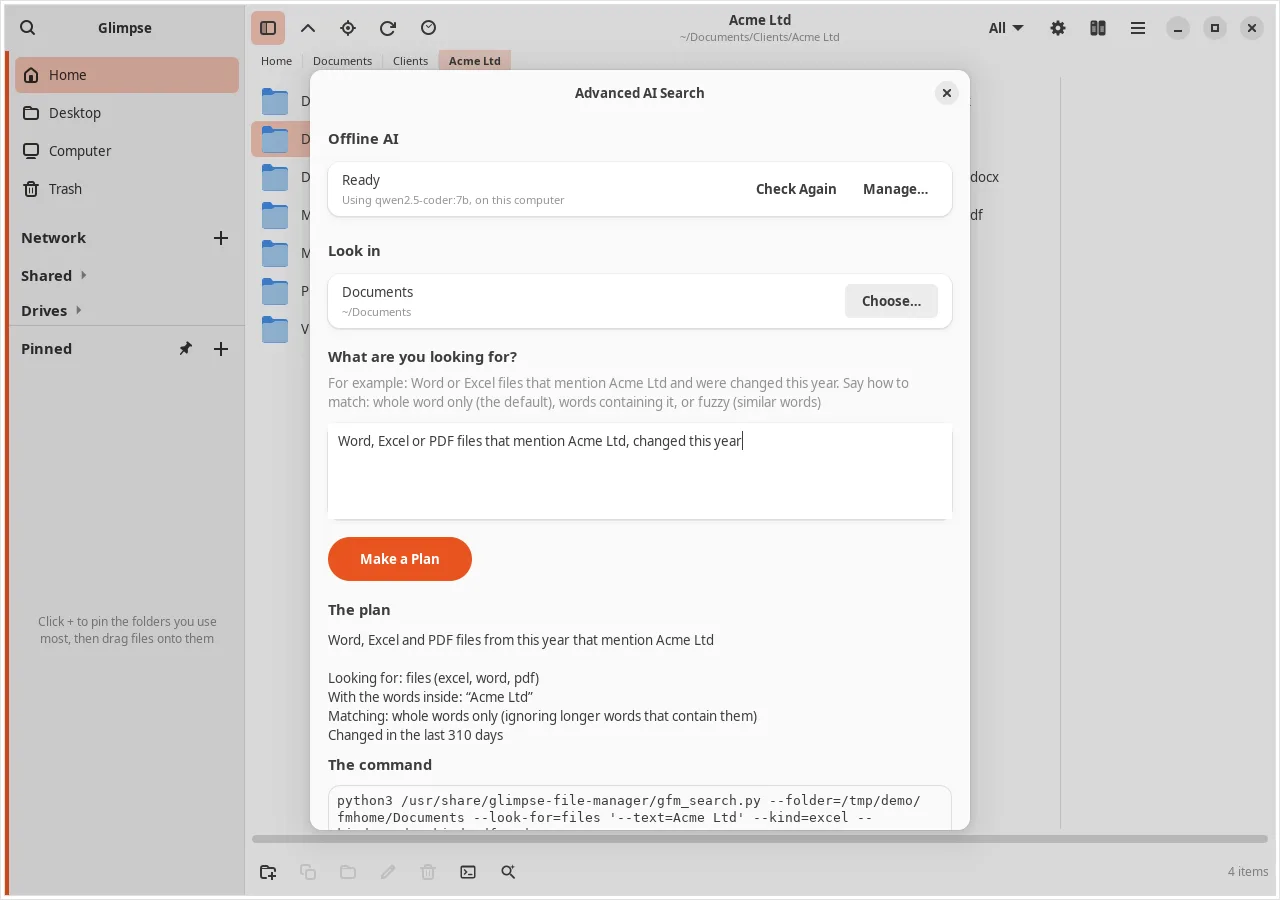
Advanced AI Search
- Describe what you want in your own words: “Word or Excel files that mention Acme Ltd, changed this year”
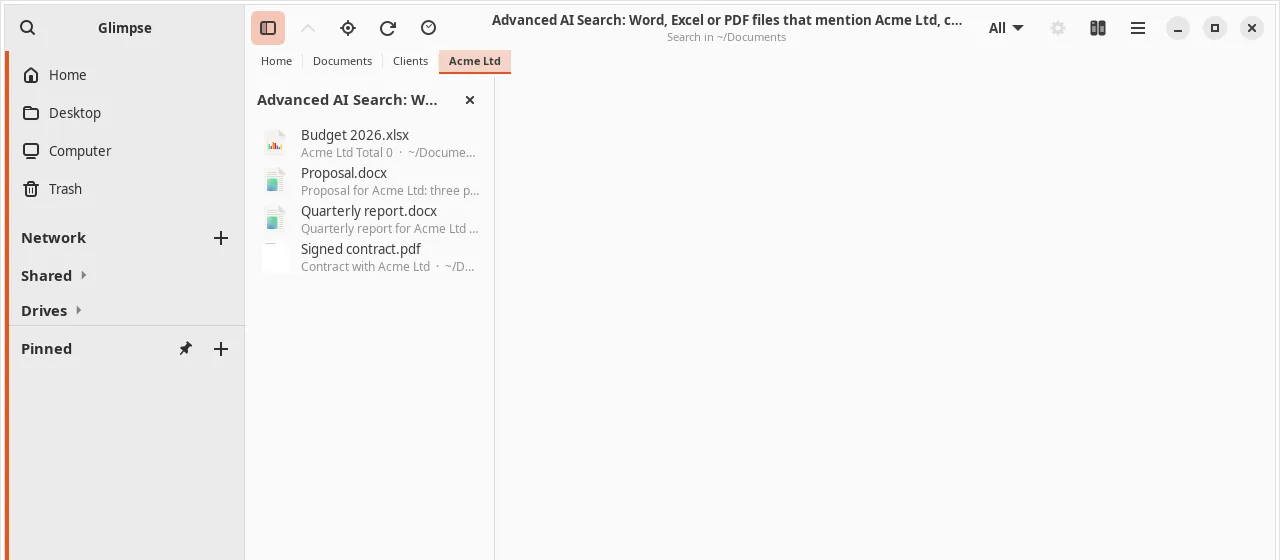
- Finds files and folders, and the words inside Word, Excel, PowerPoint, OpenDocument, PDF and text files
- Say how to match: whole words (the default), words containing it, or fuzzy for similar words and typing mistakes; the plan states the choice before anything runs
- The AI runs offline on your own computer with Ollama, and is never sent your folders or file contents; the app can install and manage it for you
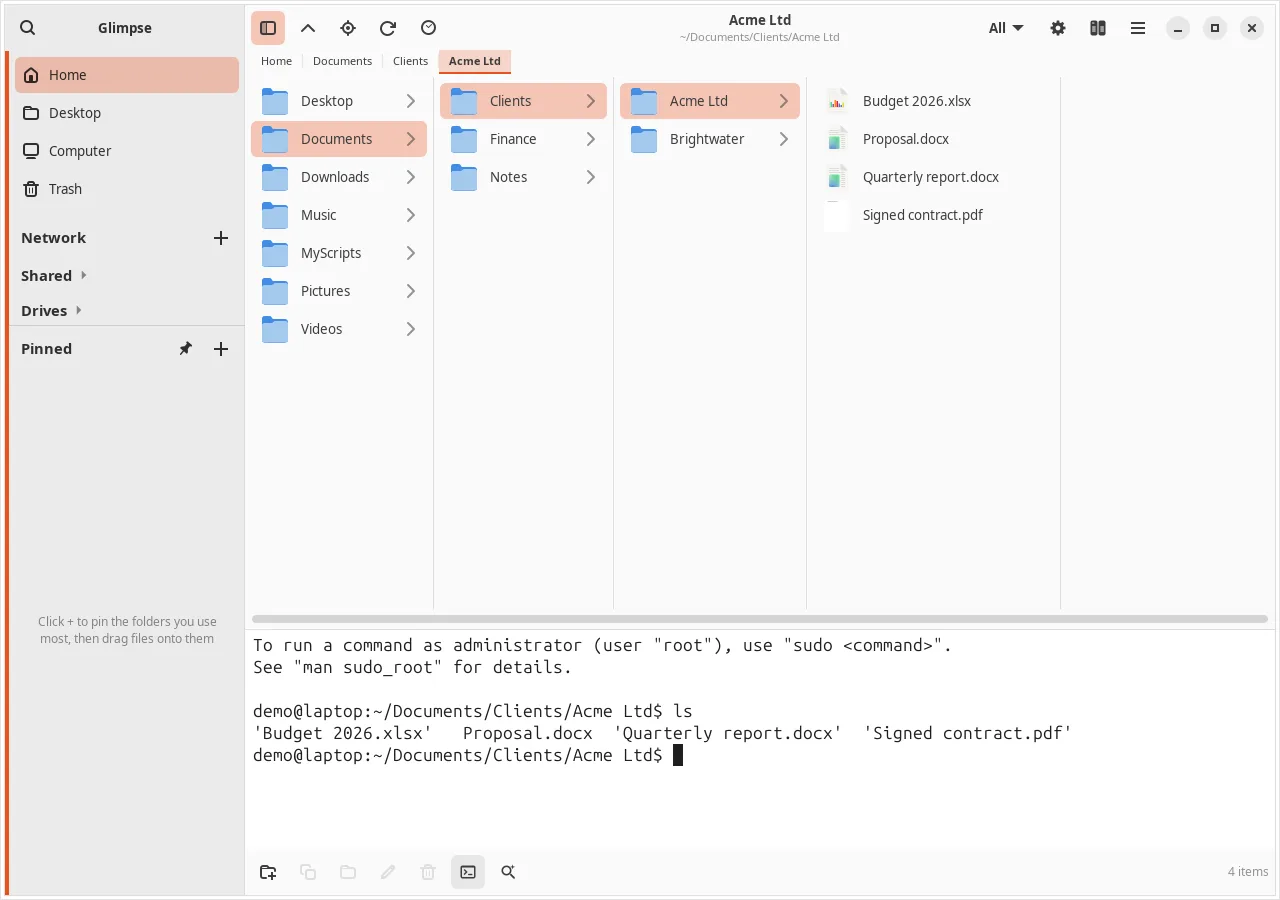
- Run the search in the built-in Terminal, or list the results in the columns with the matching text beside each; it only reads, never changes anything
- Help has a page of examples, and the app understands terms like “whole word”, “fuzzy”, “last 3 months” and “spreadsheets” itself
Columns and previews
- Start from Home, a folder, a drive or a pinned folder and click your way down, one column per folder
- Preview pictures (also camera RAW, HEIC, AVIF, WebP), videos and songs, PDFs, Office and LibreOffice files, e-books, comics, archives, fonts, Markdown, code in colour, emails, calendars, databases and more
- Press Space for a bigger look; videos and songs play
- An address bar, folder tabs along the path and a History button
- Open pictures, videos and music full size in Glimpse's own viewer
A terminal under the columns
- Press F4: your shell, started in the folder you are in and following you from folder to folder
- Run a script from a right-click menu, or keep your own Scripts menu
- Four ready-made Glimpse Scripts: File Search, Launcher Tool, Mirror Manager and Samba Manager
Organise
- Copy, cut and paste, also to and from GNOME Files; drag onto any folder to move, hold Ctrl to copy
- Moves and copies show progress in the bottom bar, copying several items at once
- Undo (Ctrl+Z) puts back moves, copies, renames and deletions, out of the Trash too; the Trash shows each connected drive's Trash
- Extract zip, tar, 7z, RAR and more, with passwords; make zip (with AES password), tar and 7z archives
- Change who can read, change and run files in Properties, also for everything inside a folder
- The Organiser (F3): three folders beside the columns for moving files about
Search and tags
- Search pinned folders, everywhere or chosen drives, for files, folders or both; it runs in the background so the window never waits
- Find by name, type, date and tag
- Tag any file or folder; Tags in the sidebar groups things from different places; pictures keep tags as standard XMP and IPTC keywords
Network
- Connect to Samba and Windows shares, as a guest or with a password kept in your keyring
- Browse, copy, move, rename and delete network files like any others; files opened from a share save back automatically
- Share your own folders on the network, read-only or with changes allowed
Your way
- Light or dark, and a Colour that runs through everything that lights up
- Can be your default file manager, and can stay running in the background so windows open at once
- Drives show how full they are
A closer look
Install it
For Ubuntu 24.04 LTS and newer. Open a Terminal (Ctrl+Alt+T), paste these lines one at a time and press Enter. The first two add the Glimpse software source; the last installs the app. apt fetches everything it needs from Ubuntu itself, and updates come with your normal Ubuntu updates.
sudo add-apt-repository ppa:turone/glimpse
sudo apt update
sudo apt install glimpse-file-manager
To remove it: sudo apt remove glimpse-file-manager. The software source is the Glimpse PPA on Launchpad, which has the Glimpse apps.
The code is open: launchpad.net/glimpse-file-manager. Problems and ideas go there too, or to support@glimpse-media.com.
Designed by Salvatore Turone and written with the help of Claude Code, Anthropic's AI coding tool: the ideas, design and testing are his; Claude wrote most of the code.
More from Glimpse
 Glimpse Media Viewer
View pictures and play videos and music.
 Glimpse Music
Play the music on your computer, drives, shares and servers.
 Glimpse Commands
Ask how to do something in the Ubuntu terminal, and get the command.
 Glimpse Network Scanner
See every device on your network, and what it is.
 Lighthouse Launcher
A home screen for Android that is easy for everyone.
Glimpse Media apps are free, with no adverts. If one has helped you, you can say thanks:
☕ Buy me a coffee